Heed

Never miss a booking, an order or a guest.

Heed watches the apps you work with and turns the notifications that matter, like new bookings, cancellations, delivery offers and guest messages, into reminders that follow up until you've seen them: a gentle pop-up, an alarm or a call-style ring. You decide which ones, how often and for how long.

  • Works with the apps you already use
  • Set up in seconds
  • Nothing leaves your phone
Heed's Home screen: Heed is watching with 7 active rules. Active reminders: a Booking.com Pulse cancellation ringing as an alarm, a message from Mom ringing like a call, and a new DoorDash order.
Who it's for

Built for people who work from their phone

One missed notification can cost you a booking, a delivery or a customer. Heed comes with ready-made rules for the apps hosts, couriers and restaurants rely on, and it knows the difference between a new booking and a cancellation. Every rule is a suggestion: keep the ones you want and adjust how often they remind you.

Hosts & property managers

Airbnb, Booking.com Pulse, Agoda, Vrbo, Expedia Partner Central, Hostaway, Guesty, Smoobu, Lodgify

  • Cancellations sound an alarm, repeated every 5 minutes until you've seen it.
  • New bookings and booking requests get a pop-up, repeated every 10 minutes until you've seen it.
  • Guest messages get a gentle reminder every 15 minutes until you open them.
Couriers & drivers

DoorDash, Uber, Bolt, Wolt, Deliveroo, Just Eat Takeaway, Lyft, Grubhub, Instacart, talabat, efood, Foody

  • New orders and trip offers ring like a phone call for up to 3 minutes, because offers expire fast. It stops on its own.
  • Cancelled orders get a short pop-up, just twice.

Restaurants & shops

Uber Eats Orders, DoorDash Order Manager, Wolt Merchant, Glovo, Bolt Merchant, Foody, talabat

  • New orders sound an alarm, repeated every minute until you've seen it.
  • Cancelled orders sound an alarm, repeated every 2 minutes until you've seen it.

Ready-made rules recognise the wording those apps use in English and Greek, and you can add your own words in any language. Change any timing or switch a rule off whenever you like. Using another app for work? Point a rule at it in a few taps.

Features

Important notifications, handled the way you want

Android shows a notification once and moves on. With Heed, you decide which ones matter and how they should follow up. Everything else stays as quiet as before.

Setup

Ready in seconds

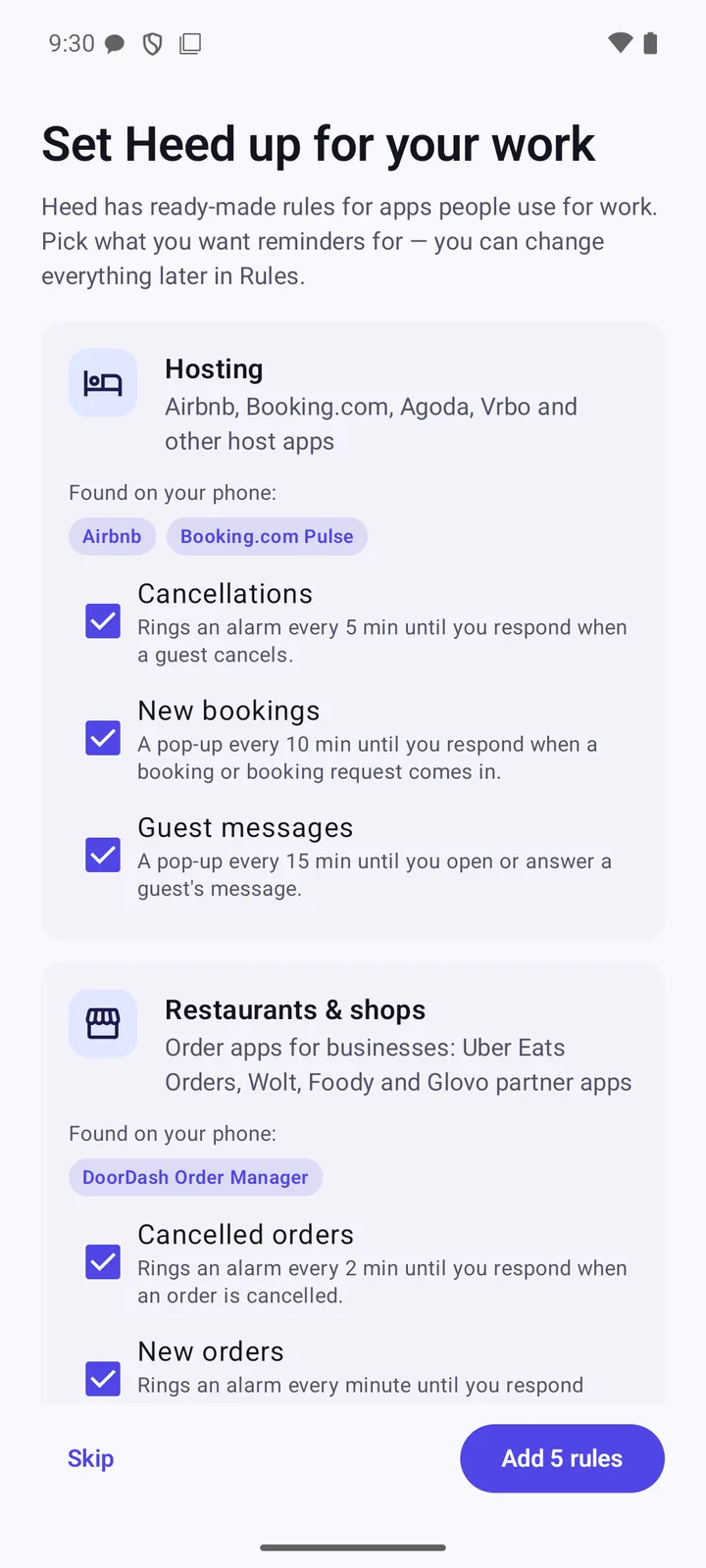
The first time you open Heed, it looks for the work apps on your phone and suggests ready-made rules for exactly those. Tick what you want and tap Add.

  • Only suggests rules for apps you actually have installed.
  • Cancellations are checked first, so a cancelled booking never counts as a new one.
  • Installed a new work app later? Add its rules from New rule → For your work.
  • A short tour shows you around. Skip either one if you prefer.
Set Heed up for your work: Hosting found Airbnb and Booking.com Pulse with Cancellations, New bookings and Guest messages ticked; Restaurants and shops found DoorDash Order Manager. Button: Add 5 rules.
Reminders

Reminders that follow up, on your terms

Pick how Heed gets your attention: a pop-up, a full-screen alarm, or a screen that rings like an incoming call. It repeats only as often and as long as you set, and stops as soon as you acknowledge it or open the app.

  • You set the interval and a limit: a few times, a few minutes, or until you've seen it.
  • Start gently: a few pop-ups first, and an alarm only if you choose to escalate.
  • Optional, per rule: show it full screen and let it ring even when the phone is on silent, for the alerts that can't wait.
  • Pause Heed for an hour, set quiet hours, or snooze a reminder with one tap.
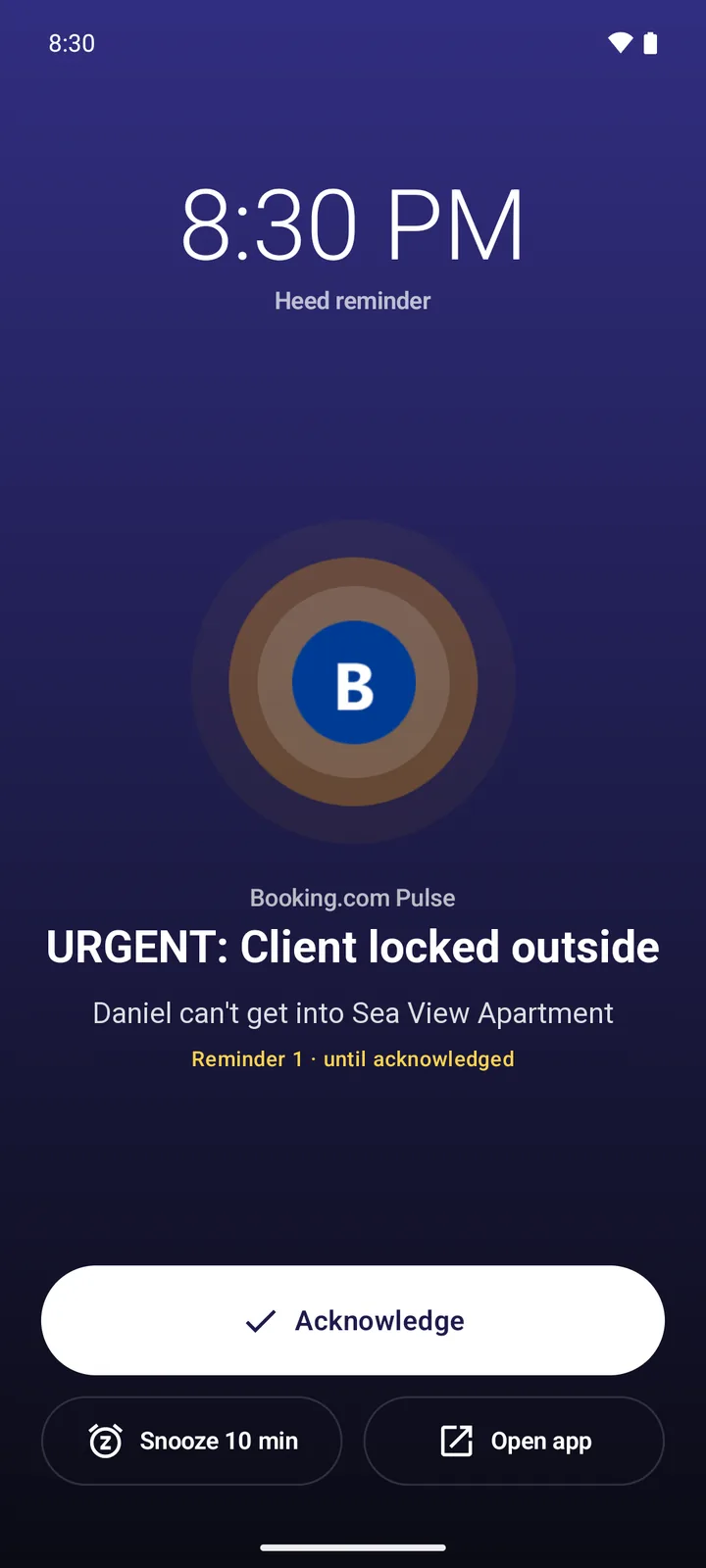
Full-screen alarm reminder from Booking.com Pulse: URGENT: Client locked outside. Daniel can't get into Sea View Apartment. Buttons: Acknowledge, Snooze 10 min, Open app.
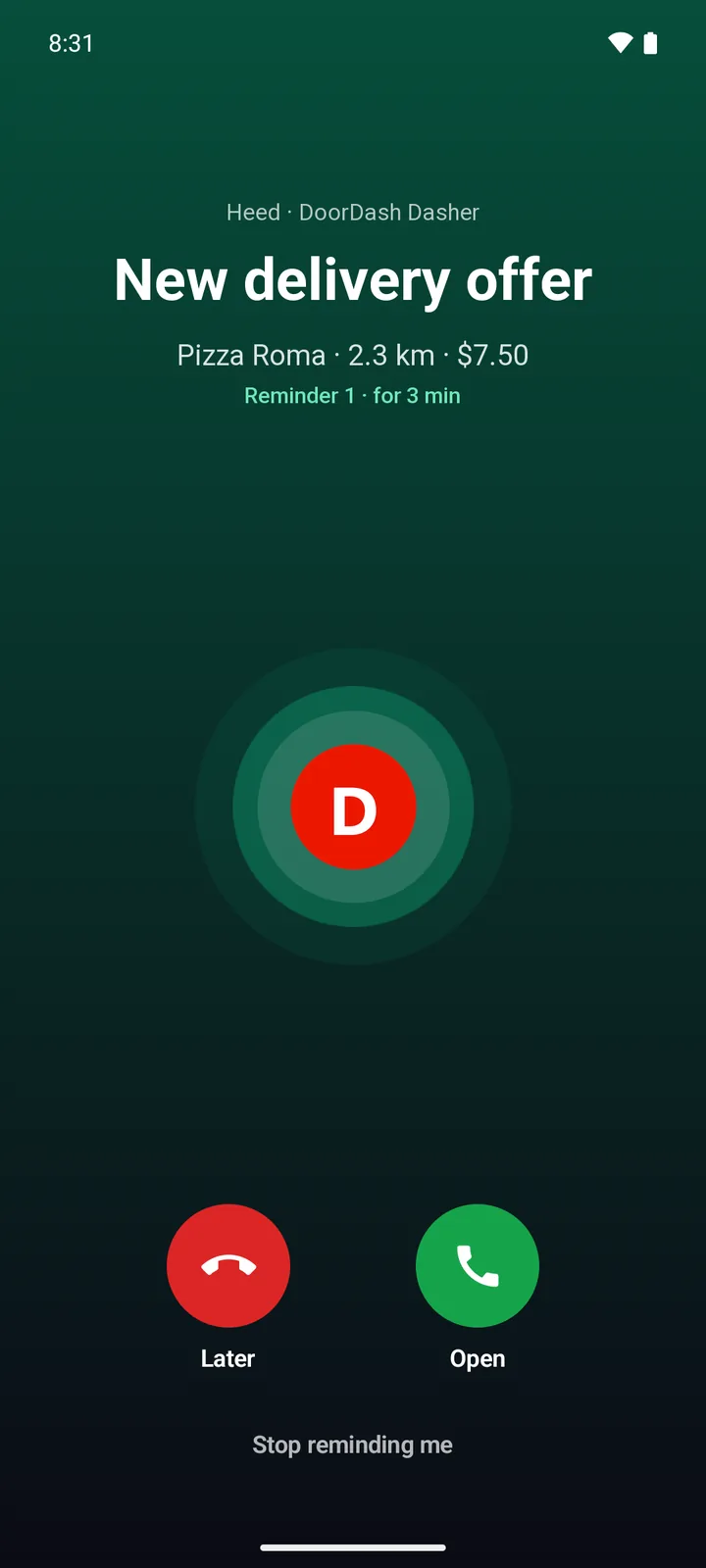
Call-style reminder from DoorDash Dasher: New delivery offer, Pizza Roma, 2.3 km, $7.50. Reminder 1, for 3 minutes. Buttons: Later and Open.
Rules

Decide what gets your attention

Every rule is a few simple blocks: which app, which person, which words, what time of day. Then choose what happens: remind, filter it out, snooze it, or tag it with a category.

  • Tap any notification in History and Create rule fills in the app and its wording for you, for example Airbnb + “New booking request”.
  • Run test shows which of your past notifications a rule would catch.
  • Each rule reads back in plain words, so you always know what it does.
  • Quiet hours keep the night calm, and anything tagged Urgent can still break through.
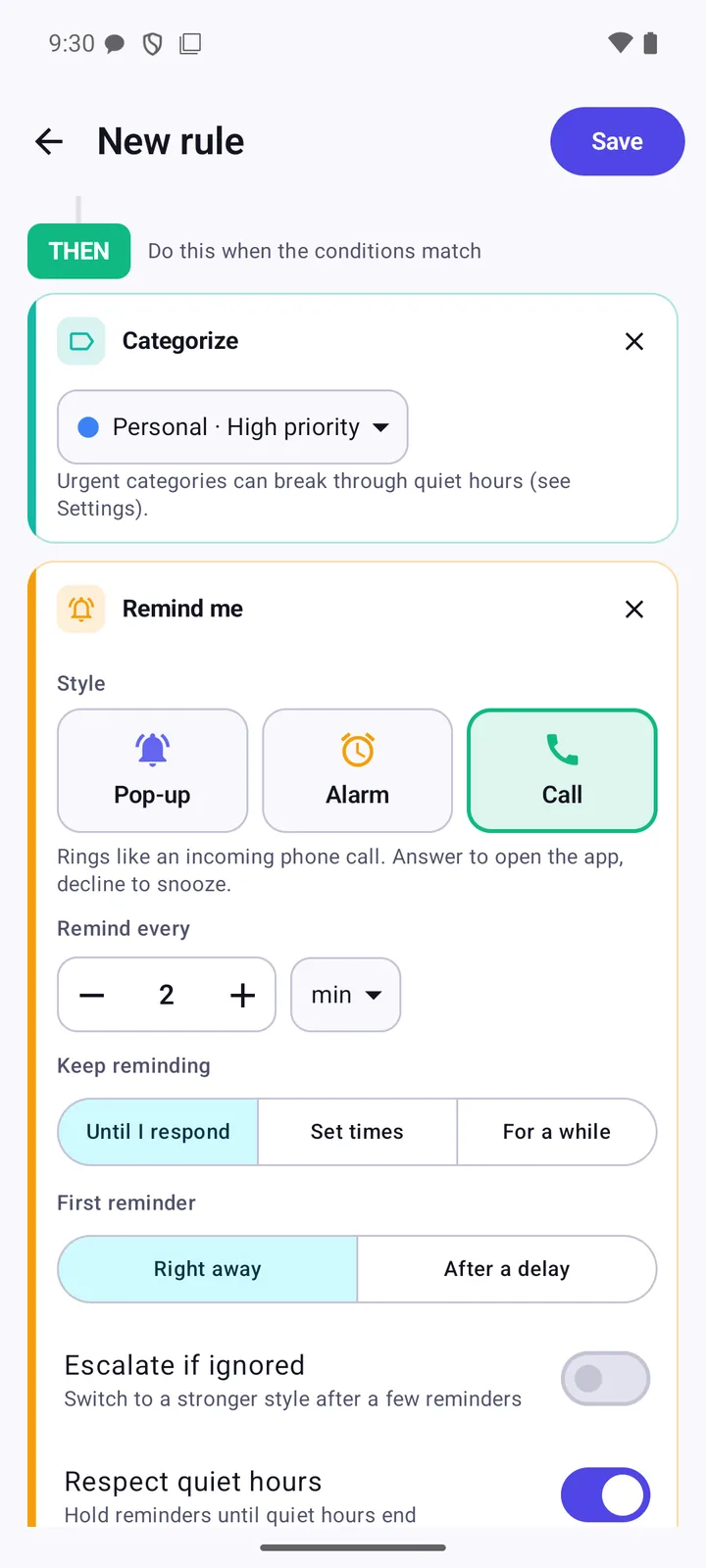
Rule editor: THEN categorize as Personal, high priority, and remind me in Call style every 2 minutes until I respond, first reminder right away.
History

See every notification, even deleted ones

Every notification is kept the moment it arrives, so you still have the guest's message or the order details after they disappear from the screen. In chats, Heed spots messages that were unsent or edited and keeps the original text.

  • Search everything by app, person or words, including notifications you filtered out.
  • Labels for Unsent message, Removed by app, Filtered and Reminded.
  • Keep history for 7, 30, 90 or 365 days, or forever. Clear it any time.
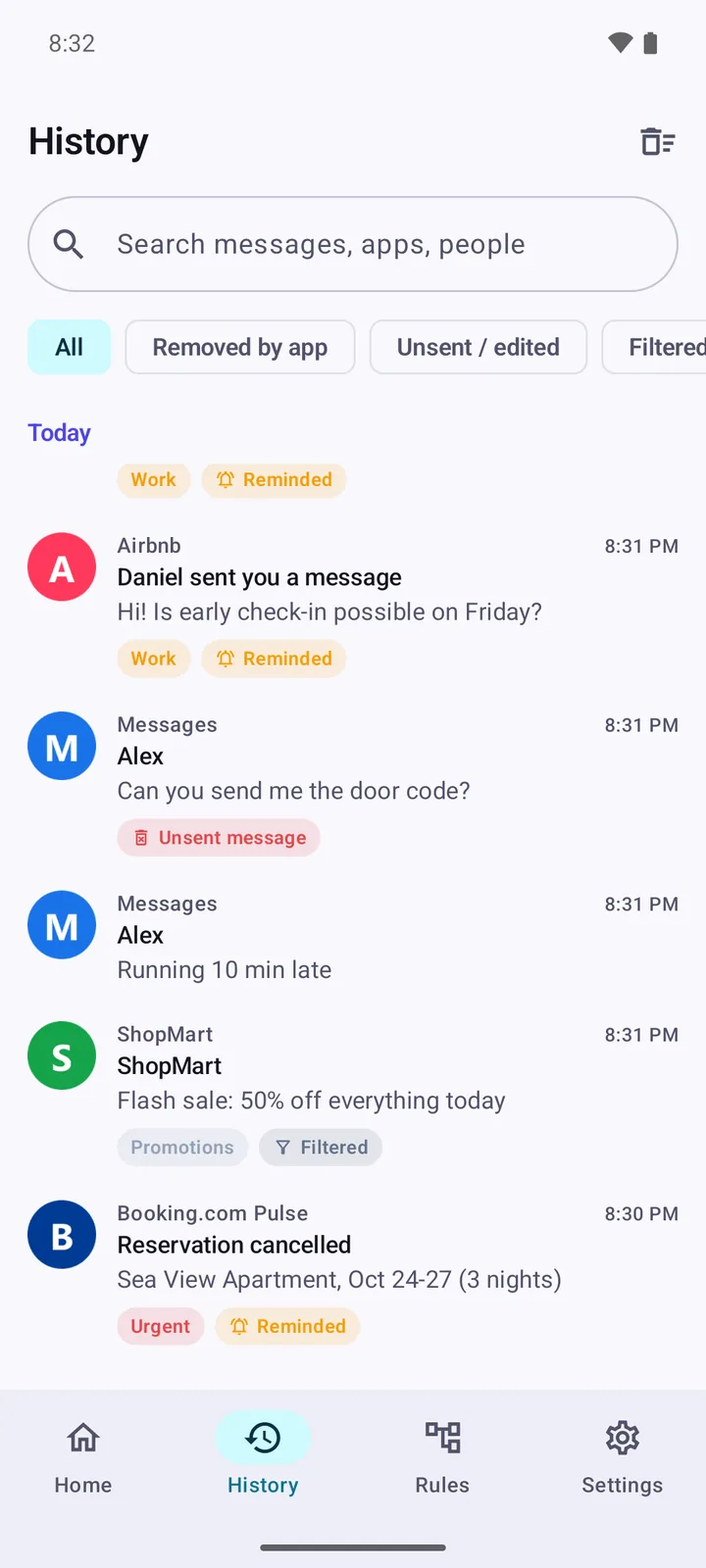
History: an Airbnb guest message, an unsent chat message that Heed kept, and a ShopMart promotion that was filtered out but stays searchable.
And more

Small things that make a big difference

Rings on a muted phone

Alarm and call reminders play at alarm volume, and Heed can switch a silenced phone to ring for the reminder, then put it back. For the ones that must not slip, a rule can also set a backup alarm in your Clock app.

Off duty with one tap

Pause Heed for an hour, or set quiet hours for the evening. When you silence your phone, Heed asks whether to pause too, and the question disappears by itself.

Widget and quick toggle

A home-screen widget in four sizes and a Quick Settings tile, so you can see whether Heed is on and switch it without opening the app.

For the people who matter too

Pick a contact and their messages can ring like a call. Get reminded about missed calls until you call back, and about emails from a sender until you read them.

Less noise

Filter out promotions and other noise automatically. Filtered notifications leave your screen but stay searchable in History.

43 languages, light or dark

Heed follows your phone's language and theme, or you choose them yourself: from English, Greek and Spanish to Arabic, Hindi and Japanese.

Privacy

Your guests' and customers' messages never leave your phone.

Heed reads your notifications to do its job, so it was built to keep them to itself. Your history, rules and settings live in the app's private storage on your device, and nowhere else.

  • No internet permissionThe app can't connect to the internet at all, so nothing can be uploaded.
  • No accountNo sign-up, no login, no cloud profile.
  • No ads, no trackingNo analytics, advertising or crash-reporting libraries phoning home.
  • You're in controlChoose how long history is kept, turn it off, or clear it any time.
Read the privacy policy
How it works

Up and running in three steps

  1. Allow notification access

    A short setup lets Heed see your notifications and show reminders. Optional permissions for precise timing and full-screen alarms make it even more reliable.

  2. Pick your work rules

    Heed finds the work apps on your phone and suggests ready-made rules for them. Keep them as they are, change them, or build your own.

  3. Get reminded, on your terms

    When something important arrives, Heed follows up as you've set it, and stops once you acknowledge it or open the app. Pause it any time.

FAQ

Good to know

Which apps does Heed work with?

Any app that shows notifications on your phone. Heed has ready-made rules for popular hosting, delivery and restaurant apps such as Airbnb, Booking.com, Vrbo, DoorDash, Uber, Bolt, Wolt and Glovo. For any other app, create a rule in a few taps, or tap one of its notifications in History and choose Create rule.

Does Heed accept orders or reply to guests for me?

No. Heed makes sure you notice. Tap Open on a reminder and the app that sent the notification opens, so you can respond yourself.

My work app's notifications aren't in English. Will the rules still work?

The ready-made rules recognise common wording in English and Greek. For other languages, open the rule and add the words your app uses, for example the word it uses for “cancelled”.

My reminders arrive late. What can I do?

Some phone makers (for example Xiaomi, Huawei and some Samsung modes) use aggressive battery savers that delay background work. Set Heed's battery usage to Unrestricted in your phone's settings. Granting Precise timing in Heed also helps.

Will alarm and call reminders take over my screen?

On Android 14 and newer that needs the Full-screen reminders permission. Without it, alarm and call styles still ring, but appear as persistent pop-up notifications instead.

Does Heed ring during Do Not Disturb?

Heed never changes Do Not Disturb. Call-style reminders ring through it only if you allow that in Heed's settings, and you can let Urgent reminders break through your quiet hours.

What does “Removed by app” mean? Was the message deleted?

It means the app that posted the notification withdrew it. That happens when the sender deletes a message, but also when you read it on another device, such as your computer. Android doesn't tell apps which of the two it was, so Heed can't either.

Why can't Heed see one-time codes?

Starting with Android 15, the system hides one-time passcodes from apps that read notifications, as a security measure. Heed sees “Sensitive notification content hidden” instead of the code.

Coming soon to Google Play

Heed is in testing now. Want to try it first? Join the beta and help shape it. Works on Android 8.0 and newer.

Join the beta Google Play: coming soon